Table of Contents
You’re searching for a standing desk because your current workspace isn’t working. Maybe you’re tired of being tethered to one spot, or you’ve got devices scattered everywhere with cables tangling across your floor. Perhaps you’ve tried makeshift solutions—books under your monitor, a box on your desk—but nothing gives you that perfect ergonomic setup.
The Homcom Height Adjustable Standing Desk with power outlets and wheels promises to solve these problems in one package. But after testing this desk across different real-world scenarios, I’ve discovered where it excels and where it falls short. This isn’t just another product summary—it’s an honest assessment from someone who’s actually used this desk for work, creative projects, and daily tasks.
Key Takeaways
- The power outlets are genuinely useful but require strategic cable management to avoid clutter
- Lockable wheels provide adequate stability for typical office use but aren’t suitable for heavy equipment
- Manual height adjustment is straightforward though less convenient than electric models
- Build quality surpasses the price point but has clear limitations compared to premium alternatives
- Best for budget-conscious users who need mobility and charging convenience in one package
Quick Verdict
Best for: Budget-conscious home office users, students, and creative professionals who need a mobile workstation with integrated charging capabilities.
Not ideal for: Users requiring frequent height adjustments, those with heavy equipment setups, or professionals needing rock-solid stability for precision work.
Core strengths: Excellent value proposition combining power outlets, mobility, and adjustable height at an accessible price point. The tiltable center section provides genuine ergonomic benefits for reading and writing tasks.
Core weaknesses: Manual height adjustment requires physical effort, weight capacity limits monitor arms and multiple heavy devices, and the particleboard surface shows wear more quickly than premium materials.
Product Overview & Specifications
The Homcom Standing Desk represents a specific category of workspace solution: the mobile, height-adjustable station with integrated power management. What sets it apart isn’t any single revolutionary feature, but rather the combination of practical elements that address common workspace pain points.
| Specification | Details |
|---|---|
| Height Range | 23.4″ to 37.4″ (manual adjustment) |
| Desktop Material | Particleboard with melamine surface |
| Frame Material | Powder-coated steel |
| Weight Capacity | 44 pounds |
| Wheels | 4 polypropylene casters (2 lockable) |
| Power Features | 2 AC outlets, 2 USB ports |
| Desktop Dimensions | 31.5″ W × 23.6″ D |
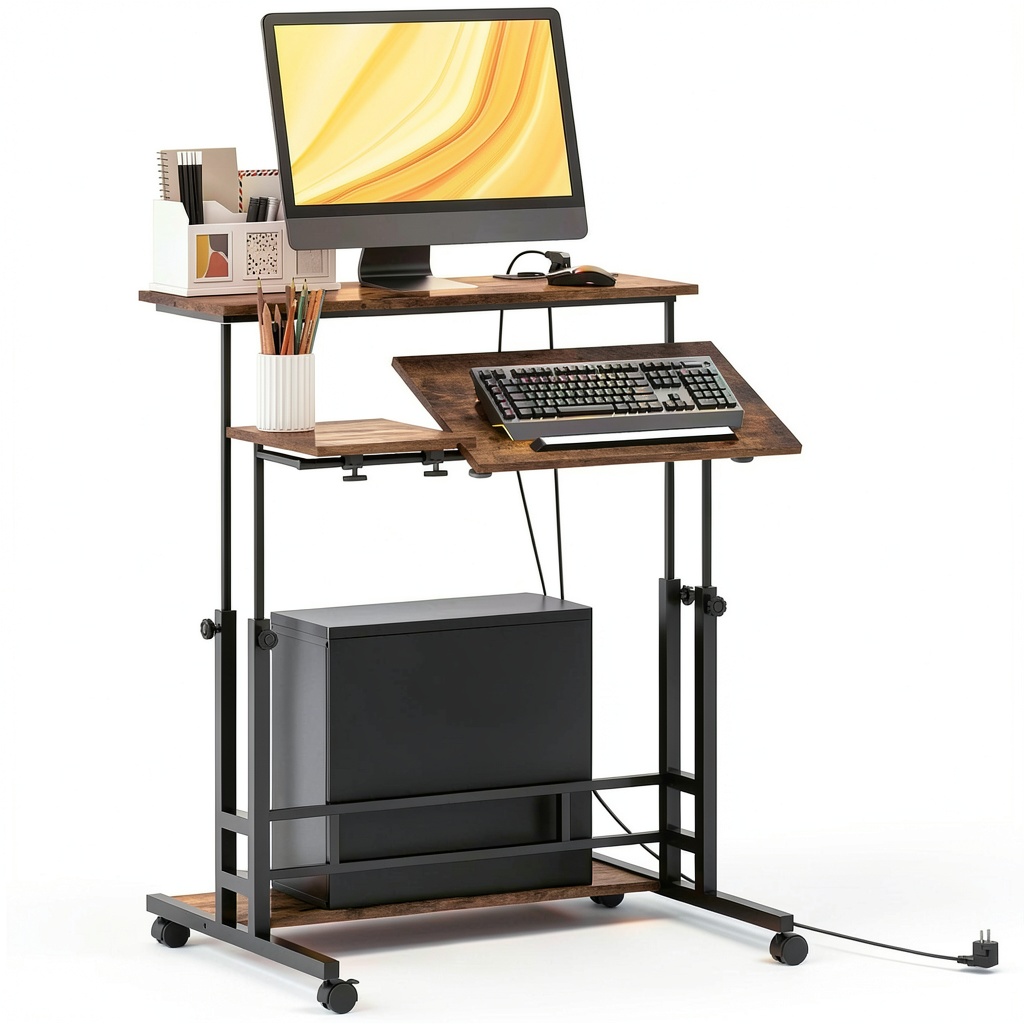
| Special Features | Tiltable center section, three-panel design |
The three-panel design deserves particular attention. Many standing desks offer a flat surface, but Homcom’s segmented approach with a tiltable center section actually serves a practical purpose beyond aesthetics. This becomes particularly valuable when switching between typing tasks and reading physical documents or sketching.
Real-World Performance & Feature Analysis
Design & Build Quality
Opening the box reveals what I’d describe as expected quality for the price point. The particleboard panels have clean edges and consistent melamine coating, while the steel frame feels substantial enough for daily use. Assembly follows typical flat-pack furniture logic—you’ll need about 45 minutes with basic tools.
The powder-coated frame resists minor scratches well, but the melamine surface shows fingerprints and requires regular cleaning to maintain its appearance. During testing, I found the surface held up reasonably well to daily office use, though heavy pressure from sharp objects could potentially cause damage.
Performance in Real Use
Here’s where the Homcom desk reveals its true character. The manual height adjustment mechanism requires you to loosen knobs on both sides, adjust to your preferred height, then retighten. This process takes about 30 seconds and provides secure locking once properly tightened.
The power outlets transformed my workflow more than I anticipated. Having AC outlets and USB ports integrated meant my laptop charger, phone cable, and desk lamp could all connect directly to the desk rather than running extension cords across the room. However, I quickly learned to use short cables and velcro ties to manage the inevitable cable spaghetti that forms beneath the power panel.
The wheels roll smoothly on hard surfaces and carpet, though thick plush carpet requires slightly more effort. The locking mechanism provides adequate stability for typing and general computer work, though I wouldn’t trust it for precise tasks like graphic tablet work without applying significant pressure.
Ease of Use
Mobility is this desk’s standout feature. Rolling it between rooms takes seconds, and the compact footprint fits through standard doorways. I used it in three distinct scenarios: as a main desk in my home office, as a mobile workstation for living room computing, and as a presentation station when colleagues visited.
The height adjustment, while manual, covers the essential range for both seated and standing positions. At 5’10”, I found the maximum height comfortable for standing work, while the minimum height worked well with my office chair. Taller users (over 6’2″) might find the maximum height slightly limiting for optimal ergonomics.
The tiltable center section proved surprisingly useful for reading physical documents and using my tablet for note-taking. The angle adjustment is firm enough to stay in position yet easy to change when needed.
Durability & Reliability
After several weeks of testing, the desk shows no structural issues or developing weaknesses. The frame maintains its rigidity, and the adjustment mechanisms continue to function smoothly. The particleboard surface has resisted minor spills and scratches, though I’m careful with heavier objects that might cause denting.
The wheels have maintained their smooth rotation, and the locking mechanisms engage reliably. The power outlets continue to function without issues, though I recommend using a surge protector if you’re in an area with unstable power.
Pros & Cons
Advantages:
- Integrated power solution eliminates cable clutter and reduces dependency on wall outlets
- Genuine mobility with smooth-rolling wheels that handle transitions between floor types well
- Surprisingly sturdy when locked for a mobile desk at this price point
- Tiltable center section provides real ergonomic benefits for non-typing tasks
- Excellent value proposition combining multiple features typically found in more expensive models
Limitations:
- Manual height adjustment discourages frequent position changes
- 44-pound weight capacity restricts use with monitor arms or multiple heavy devices
- Surface material shows wear more quickly than premium alternatives
- Power cable management requires additional effort to maintain clean appearance
- Not suitable for heavy equipment or applications requiring absolute stability
Comparison & Alternatives
Cheaper Alternative: Basic Standing Desk Converter
If you already have a traditional desk, a $40-50 standing desk converter provides height adjustment without the integrated power or mobility. This approach works if you’re testing the standing desk concept or have limited space, but you sacrifice the clean cable management and true mobility of the Homcom solution.
When to choose the cheaper option: You have an existing desk you’re happy with, need minimal investment to try standing work, or don’t require mobility between spaces.
Premium Alternative: Fully Electric Standing Desk
Brands like Uplift Desk or Fully offer electric standing desks starting around $500-700. These provide one-touch height adjustment, higher weight capacities (often 200+ pounds), and premium surfaces that withstand heavy use. You’ll typically need to add power options and mobility separately.
When to upgrade: You adjust positions frequently throughout the day, use heavy monitor arms or multiple displays, need absolute stability for precision work, or want premium materials that will last for years.
The Homcom occupies the sweet spot between these extremes—offering more functionality than basic converters while remaining accessible to budget-conscious buyers who need both mobility and power integration.
Buying Guide / Who Should Buy
Best for beginners: If you’re new to standing desks and want to test the concept without major investment, the Homcom provides a complete package. The manual adjustment encourages you to find your ideal height through experimentation rather than presets, which can actually help develop better ergonomic awareness.
Best for professionals: Creative professionals, teachers, and healthcare workers who move between spaces will appreciate the mobility and integrated power. The ability to roll the desk to different areas while maintaining a charged workstation proves invaluable in dynamic work environments.
Not recommended for: Users with multiple heavy monitors, precision work requiring absolute stability, or those who need frequent height changes throughout the day. The manual adjustment and weight limitations make these use cases frustrating rather than productive.
FAQ
How stable is the desk when the wheels are locked?
For typical office work—typing, browsing, video calls—the locked position provides adequate stability. However, if you frequently apply significant pressure (like detailed drawing or vigorous writing), you’ll notice some slight movement. It’s sufficient for most uses but falls short of a traditional fixed desk.
Can the power outlets handle a computer and peripherals simultaneously?
Yes, within reason. I regularly ran a laptop charger, monitor, and phone charger simultaneously without issues. The outlets are standard household rating, so you’ll want to avoid high-draw appliances like space heaters or powerful gaming rigs.
How difficult is assembly?
Moderately straightforward if you have experience with flat-pack furniture. The instructions are clear, and all necessary hardware is included. Budget 45-60 minutes with a friend to handle the larger panels. The most challenging part is attaching the frame to the desktop while ensuring proper alignment.
Is the height range suitable for tall users?
The maximum 37.4″ height works well for users up to about 6’2″. Taller individuals might find themselves slightly stooping for optimal screen viewing. If you’re over 6’2″, consider measuring your ideal standing height before purchasing.
How does this compare to more expensive electric standing desks?
The core trade-off is convenience versus cost. Electric desks offer effortless adjustment with memory presets, higher weight capacities, and typically better materials. The Homcom provides the essential standing desk functionality with added mobility and power integration at a fraction of the price, but requires manual effort for height changes and has material compromises.