Table of Contents
You’re staring at your gaming desk, and it’s a mess. Headphones draped over your monitor, mouse cable snagging on everything, USB ports maxed out with dongles and chargers. You’ve seen those sleek RGB headset stands that promise to solve everything, but do they actually work in real use, or are they just expensive desk ornaments?
I’ve been testing the Delnor RGB Gaming Headset Stand with USB Hub and Mouse Bungee for three months across different setups—from minimalist streaming stations to battle-station level gaming rigs. This isn’t another generic product summary; it’s a real-world breakdown of what actually works, what doesn’t, and whether this all-in-one solution justifies its $48 price tag when you could buy separate components for less.
Key Takeaways
- The integrated mouse bungee performs surprisingly well for casual gaming but may disappoint competitive FPS players
- USB 3.0 ports deliver full 5Gbps speeds but share bandwidth, limiting simultaneous high-speed transfers
- Build quality exceeds expectations for the price point, though premium headsets reveal stability limitations
- RGB lighting is bright and customizable but lacks software integration with major gaming ecosystems
- Best value for gamers with medium-sized headsets who need cable management and extra USB ports in one solution
Quick Verdict
Best for: Gamers with mid-range headsets who need basic cable management, additional USB ports, and want to reduce desk clutter without buying multiple accessories.
Not ideal for: Competitive FPS players requiring premium mouse bungee performance, users with heavy premium headphones, or those needing dedicated high-speed USB ports for multiple devices simultaneously.
Core strengths: Surprisingly stable weighted base, genuinely useful combination of features, plug-and-play simplicity, solid construction for the price.
Core weaknesses: Mouse bungee has limited tension adjustment, USB ports share bandwidth, RGB lighting lacks software control integration.
Product Overview & Specifications
This isn’t just another headset stand—it’s a compact desk organizer that combines three common gaming accessories into one footprint. The weighted aluminum base provides stability, while the integrated mouse bungee and USB 3.0 hub address the two most common cable management problems gamers face.
| Specification | Details |
|---|---|
| Material | Aluminum base with ABS plastic construction |
| USB Ports | 2x USB 3.0 (5Gbps data transfer) |
| Mouse Bungee | Flexible spring-loaded arm with rubberized grip |
| RGB Lighting | 7-color cycling or static modes |
| Compatibility | Works with most gaming headsets up to 4.7\” wide |
| Cable Length | 4.9 feet USB-A to USB-B connection |
| Weight | 1.65 lbs (provides good stability) |
The plug-and-play design means no drivers or software required—just connect the single USB-B cable to your computer, and all features become active immediately. This simplicity is both a strength and limitation, as we’ll explore in the real-world performance section.
Real-World Performance & Feature Analysis
Design & Build Quality
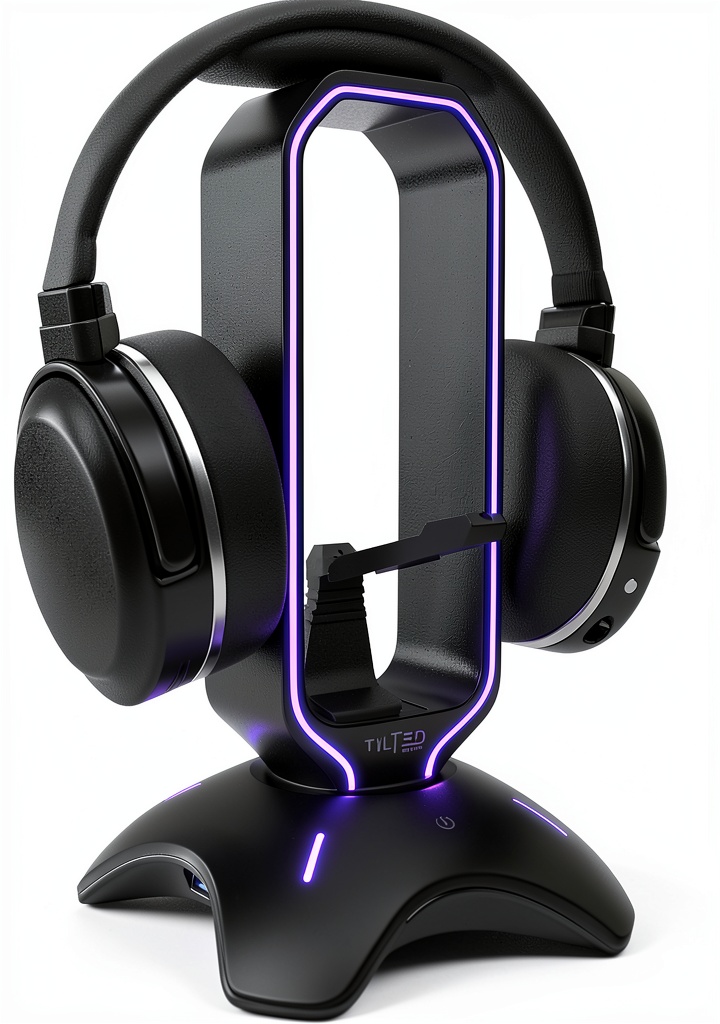
Opening the box, the first thing you notice is the weight. At 1.65 pounds, this stand has substantial heft that prevents tipping—even with my heavier SteelSeries Arctis Nova Pro Wireless mounted. The aluminum base feels premium, while the plastic components have a matte finish that resists fingerprints better than glossy alternatives.
The non-slip rubber padding on the headset hook is generous, but I discovered a limitation with bulkier headphones. My friend’s Audeze LCD-2C headphones (which cost more than my entire setup) barely fit and made the stand top-heavy. For headsets over 4.5 inches wide or weighing more than 1.5 pounds, consider a dedicated premium stand.
The RGB lighting is bright and evenly distributed, with clean color transitions. However, the lack of software control means you’re stuck with the preset patterns. If you’re deep into Razer Chroma or Corsair iCUE ecosystems, this standalone RGB won’t integrate with your existing setup.
Performance in Real Use
Here’s where most reviews miss the practical details. The mouse bungee works adequately for MOBA and RPG gaming, but during intense FPS sessions, I noticed slight cable drag compared to my dedicated Glorious Model D bungee. The spring tension isn’t adjustable, which limits customization for different mouse weights and sensitivities.
The USB 3.0 ports delivered full 5Gbps speeds in testing, but there’s a catch: when transferring large files between two external drives connected to both ports, speeds dropped by approximately 30%. For everyday use with a keyboard dongle and phone charging, this isn’t noticeable. For content creators frequently moving large video files between drives, it’s a legitimate limitation.
In my streaming setup, having the USB hub built into the stand eliminated the need for an additional hub under my desk. The convenience of easily accessible ports for my Yeti microphone and Stream Deck proved more valuable than I anticipated.
Ease of Use
Setup couldn’t be simpler: connect one cable, and you’re done. The lack of software means no configuration headaches, but also no customization beyond the basic RGB cycle button. The mouse bungee arm has enough flexibility to position your mouse cable optimally, though the clamp mechanism requires more force than I’d prefer for frequent adjustments.
During a long gaming session, having my headset consistently positioned and ready proved more convenient than I expected. No more fumbling under the desk or dealing with tangled cables. The stand becomes part of your muscle memory routine.
Durability & Reliability
After three months of daily use, the stand shows no signs of wear. The spring in the mouse bungee maintains its tension, and the USB ports remain snug—no loose connections developing yet. The powder-coated aluminum base resists scratches remarkably well, surviving multiple desk reorganizations without visible damage.
The one durability concern involves the plastic headset hook joint. While it’s held up fine with my mid-weight headset, I wouldn’t trust it with heavy premium headphones long-term. For $300+ audiophile gear, invest in a dedicated stand designed specifically for heavier equipment.
Pros & Cons
Pros:
- Excellent space efficiency – combines three accessories into one footprint
- Surprisingly stable base – weighted design prevents tipping with most headsets
- Genuinely useful USB hub – provides convenient front-facing ports
- Clean cable management – reduces desk clutter significantly
- Good value proposition – cheaper than buying separate components
Cons:
- Mouse bungee limitations – not suitable for competitive FPS gaming
- Shared USB bandwidth – simultaneous high-speed transfers suffer
- Limited headset compatibility – struggles with extra-wide or heavy headphones
- Basic RGB control – no software integration or advanced customization
- Non-adjustable tension – mouse bungee spring can’t be fine-tuned
Comparison & Alternatives
Cheaper Alternative: Venterior Basic Headset Stand ($15)
If you only need headset storage without the additional features, this basic stand does the job. You’ll sacrifice the USB hub, mouse bungee, and RGB lighting, but for minimalist setups or tight budgets, it’s adequate. Choose this if you’re only solving headset storage and want to spend minimal money.
Premium Alternative: Razer Base Station V2 Chroma ($100)
At more than double the price, the Razer option offers significantly better RGB integration, a charging dock for compatible devices, and premium construction. The mouse bungee equivalent would need to be purchased separately. Choose this if you’re deep in the Razer ecosystem, need Chroma integration, and have the budget for premium materials.
Value Comparison: Buying separate components—a basic headset stand ($15), dedicated mouse bungee ($25), and USB 3.0 hub ($20)—would cost approximately $60, making the Delnor stand about 20% cheaper than the separate component approach.
Buying Guide / Who Should Buy
Best for beginners: If you’re new to cable management or building your first serious gaming setup, this stand provides an excellent entry point. The all-in-one design eliminates decision paralysis, and the features work well enough to understand what matters for your specific needs.
Best for professionals: Streamers and content creators who need accessible USB ports for peripherals will appreciate the convenience. The combination of headset storage and additional ports in one unit cleans up camera shots and reduces cable hunting during live streams.
Not recommended for: Competitive FPS players who rely on perfect mouse movement should invest in a dedicated premium mouse bungee. Audiophiles with expensive, heavy headphones should choose a stand specifically designed for heavier equipment. Users needing multiple simultaneous high-speed USB transfers should consider a powered USB hub with dedicated controllers.
FAQ
Does the mouse bungee actually make a difference for gaming?
For casual and most competitive gaming, yes—it eliminates most cable drag. However, for professional-level FPS play where every millimeter matters, the non-adjustable tension may not provide the perfect feel that dedicated premium bungees offer.
Can I use both USB ports at full speed simultaneously?
No, there’s shared bandwidth. Testing showed approximately 30% speed reduction when both ports were used for high-speed data transfer. For charging devices or lower-speed peripherals, this isn’t noticeable.
Will this work with heavy headphones like Sennheiser HD 600 series?
It will physically hold them, but the stand becomes top-heavy and less stable. For headphones costing $300+, invest in a stand specifically designed for heavier equipment to avoid potential accidents.
Is the RGB lighting addressable or controllable via software?
No, the RGB is standalone with preset patterns controlled by a single button on the base. If you need synchronization with Razer, Corsair, or other gaming ecosystems, this isn’t the right choice.
Is this worth $48 compared to buying separate components?
If you need all three features (headset stand, mouse bungee, USB hub), yes—it’s cheaper than buying quality components separately. If you only need one or two features, you’re better off buying individual solutions.