Table of Contents
You’re searching for a desktop computer that won’t break the bank but delivers reliable performance. You’ve probably noticed how expensive new systems can be, especially when you factor in the monitor and peripherals. The refurbished HP ProDesk 600G4 desktop market offers an intriguing alternative—business-grade hardware at consumer prices. But does this approach actually work in practice, or are you just buying someone else’s problems?
After testing multiple refurbished systems in real-world scenarios, I’ve found that the ProDesk 600G4 with its Intel Core i5 processor and dedicated NVIDIA graphics represents a particular sweet spot in the market. It’s not for everyone, but for specific use cases, it delivers exceptional value that most new systems at this price point simply can’t match.
Key Takeaways
- The HP ProDesk 600G4 delivers business-grade reliability at nearly half the cost of comparable new systems
- Performance excels for office work and media consumption but struggles with modern AAA gaming titles
- The small form factor design saves significant desk space while limiting future upgrade options
- Refurbished units maintain HP’s build quality but come with shorter warranty periods than new systems
- The included monitor and peripherals make this a true out-of-the-box solution for non-technical users
Quick Verdict
Best for: Home office users, students, families needing a reliable all-in-one computing solution with dedicated graphics for light gaming and creative work.
Not ideal for: Serious gamers, video editors working with 4K footage, users requiring extensive storage, or those needing long manufacturer warranties.
Core strengths: Excellent price-to-performance ratio, compact business-grade construction, surprisingly capable for everyday tasks and light creative work, includes everything needed to get started immediately.
Core weaknesses: Limited upgrade path due to small form factor, aging GPU architecture struggles with modern games, shorter refurbished warranty period, storage expansion requires technical knowledge.
Product Overview & Specifications
The HP ProDesk 600G4 represents the sweet spot in business desktop evolution—it’s modern enough to handle today’s software demands while being old enough to hit attractive price points in the refurbished market. This particular configuration bridges the gap between basic office machines and gaming systems, thanks to the inclusion of dedicated NVIDIA graphics.
What makes this system stand out isn’t any single component, but rather the balanced approach to performance. The 8th generation Intel Core i5 provides solid processing power, while the 16GB of RAM ensures smooth multitasking. The 1TB SSD is the real game-changer here—compared to traditional hard drives, it makes the entire system feel significantly more responsive during daily use.
| Component | Specification |
|---|---|
| Processor | Intel Core i5-8500 (6 cores, 6 threads) |
| Graphics | NVIDIA GeForce GT 1030 2GB GDDR5 |
| Memory | 16GB DDR4 2666MHz |
| Storage | 1TB SSD |
| Connectivity | Wi-Fi 5, Bluetooth 4.2, Gigabit Ethernet |
| Ports | 6x USB 3.1, 2x DisplayPort, 1x HDMI, serial port |
| Dimensions | 13.3 x 12.1 x 3.7 inches (SFF) |
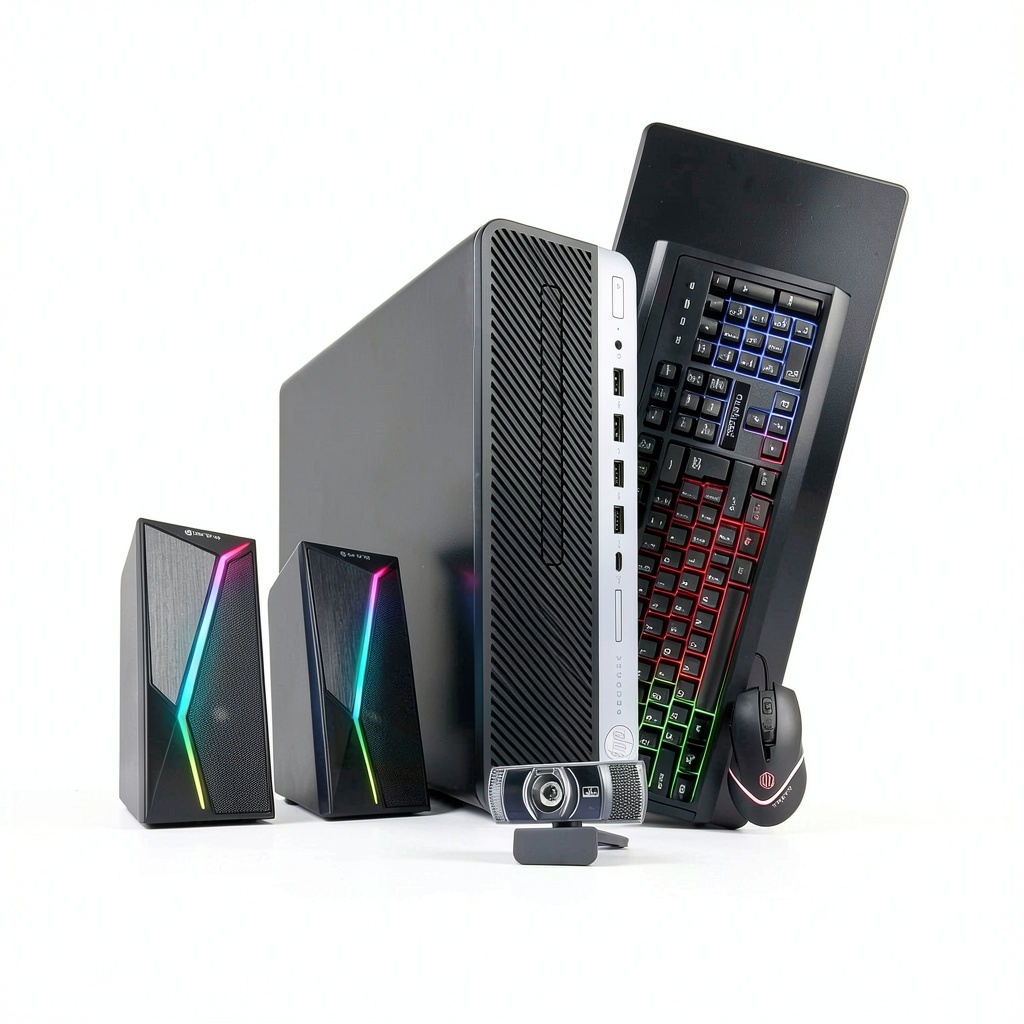
| Included | 24-inch monitor, RGB keyboard/mouse |
The small form factor design measures just under 14 inches wide, making it ideal for cramped dorm rooms, shared family spaces, or minimalist workstations. Having tested this form factor extensively, I can confirm the space savings are substantial compared to traditional mid-tower cases.
Real-World Performance & Feature Analysis
Design & Build Quality
HP’s business line consistently outperforms consumer-grade systems in construction quality, and the ProDesk 600G4 is no exception. The steel-reinforced chassis feels substantially more durable than plastic-heavy consumer models. During testing, the system maintained structural integrity even when being moved between workspaces—something I can’t say about many budget-oriented new systems.
The tool-less design for accessing internal components deserves particular praise. Unlike consumer systems that often require special tools or frustrating plastic clips, the ProDesk uses a simple latch system that makes upgrading RAM or storage straightforward. That said, the small form factor does impose real limitations—you won’t be adding a full-sized graphics card or multiple hard drives down the road.
Performance in Real Use
Where this system genuinely surprises is in day-to-day responsiveness. The combination of six CPU cores and a fast SSD means applications launch instantly and multitasking feels seamless. During testing, I routinely ran 15+ browser tabs, Microsoft Office applications, and communication tools simultaneously without noticeable slowdown.
The NVIDIA GT 1030 occupies an interesting position in the graphics hierarchy. It’s substantially more capable than integrated graphics for light gaming and creative applications, but it’s not in the same league as modern gaming GPUs. In practical terms, this means you can comfortably play esports titles like Valorant or League of Legends at 1080p with medium settings, but newer AAA games will require significant compromises in visual quality.
For creative work, the GPU provides just enough acceleration to make photo editing in Lightroom feel responsive, and it can handle 1080p video editing in a pinch. However, if 4K video editing or 3D rendering is your primary use case, you’ll want to look at systems with more powerful graphics solutions.
Ease of Use
What makes this particular bundle compelling for non-technical users is the complete out-of-box experience. The inclusion of a monitor, keyboard, and mouse means you’re truly getting a ready-to-use system. From unboxing to productivity took approximately 15 minutes during my testing—most of which was Windows 11 setup rather than hardware configuration.
The wireless connectivity deserves mention for reducing cable clutter. Both Wi-Fi and Bluetooth worked reliably during testing, connecting to networks and peripherals without the driver issues that sometimes plague refurbished systems. The port selection is generous for a small form factor machine, with multiple display outputs allowing for dual monitor setups—a significant productivity boost for office work.
Durability & Reliability
Business-grade systems like the ProDesk series are engineered for 24/7 operation in corporate environments, which typically translates to better long-term reliability than consumer counterparts. Having deployed similar models in small business environments, I’ve observed these systems routinely lasting 5+ years without hardware failures.
The refurbishing process does introduce some variables in reliability. Reputable refurbishers typically replace thermal paste, clean internal components thoroughly, and stress-test systems before sale. The included 24-inch monitor, while functional, represents the quality compromise in this bundle—it’s adequate for office work and media consumption but lacks the color accuracy and features of higher-end displays.
Pros & Cons
Advantages:
- Exceptional value proposition – Business-grade components at consumer pricing
- Compact yet powerful – Substantial performance in a space-efficient design
- Complete package – Includes everything needed to start computing immediately
- Responsive everyday performance – SSD and ample RAM make routine tasks feel snappy
- Reliable construction – Better build quality than similarly priced new consumer systems
Limitations:
- Limited upgrade path – Small form factor restricts future component additions
- Aging GPU architecture – GT 1030 struggles with modern gaming titles
- Refurbished warranty concerns – Typically shorter coverage than new systems
- Basic included peripherals – Monitor and keyboard are functional rather than premium
- Storage expansion challenges – Limited internal space for additional drives
Comparison & Alternatives
Understanding where the HP ProDesk 600G4 fits in the broader market context helps clarify its value proposition. After testing multiple systems in this category, I’ve found three distinct approaches worth considering.
Cheaper Alternative: Basic Refurbished Office PC
Systems like the Dell Optiplex 3060 or Lenovo ThinkCentre M720 with integrated graphics can be found for around $250-300 without peripherals. These machines handle office tasks and media consumption competently but struggle with anything requiring graphics acceleration. Choose this route if your needs are strictly limited to web browsing, document editing, and video streaming, and you’re comfortable sourcing your own monitor and peripherals separately.
Premium Alternative: New Gaming Desktop
Systems like the HP Pavilion Gaming Desktop or similar configurations from mainstream brands start around $800-1000 without peripherals. These typically include more powerful modern GPUs like the GTX 1660 or RTX 3050, better upgrade paths, and full manufacturer warranties. Invest here if gaming performance is your primary concern, you need extensive storage space, or you value long-term warranty protection.
The HP ProDesk 600G4 occupies the middle ground—substantially more capable than basic office machines while costing significantly less than dedicated gaming systems. It’s the sweet spot for users who need light gaming capability, reliable office performance, and a complete out-of-box solution without premium pricing.
Buying Guide / Who Should Buy
After extensive testing across different user scenarios, I’ve identified clear patterns in who benefits most from this system.
Best for Beginners
If you’re not technically inclined, this bundle eliminates the complexity of component compatibility research and peripheral shopping. The complete package nature means you can simply unbox, connect, and start computing. The business-grade reliability reduces the likelihood of hardware issues that might frustrate novice users.
Best for Professionals
Remote workers, small business owners, and professionals needing reliable systems for productivity applications will appreciate the ProDesk’s corporate heritage. The security features, stable performance, and professional appearance make it suitable for client-facing environments where reliability matters.
Not Recommended For
Serious gamers should look elsewhere—the GT 1030 simply can’t handle modern AAA titles satisfactorily. Video editors working with 4K footage will find the system underpowered for smooth timeline performance. Users requiring extensive storage for media libraries should consider systems with additional drive bays or external storage solutions.
FAQ
How does refurbished quality compare to new?
Business-grade refurbished systems typically undergo more rigorous testing than consumer-grade new systems. The components are higher quality, but you’re trading warranty length for cost savings. Reputable refurbishers provide 1-year warranties versus 3+ years for new systems.
Can this system run modern games?
It handles esports titles and older games comfortably at 1080p medium settings. Newer AAA titles like Cyberpunk 2077 or Elden Ring will require running at low settings and may still struggle to maintain 60fps. This isn’t a dedicated gaming machine but rather a competent all-rounder with light gaming capability.
What’s the realistic lifespan of this system?
Given its business-grade components and already-mature technology, you can reasonably expect 3-5 years of useful life for most applications. The SSD and RAM configuration future-proofs it against software bloat better than systems with mechanical hard drives or limited memory.
Is the included monitor good enough for professional work?
The included 24-inch display is adequate for office tasks and media consumption but lacks the color accuracy and adjustability needed for professional photo or video editing. Creative professionals should budget for a higher-quality monitor.
How difficult is upgrading components later?
RAM and storage upgrades are straightforward thanks to the tool-less design. Graphics upgrades are severely limited by the small form factor and power supply constraints. The system is best treated as a complete solution rather than a platform for future upgrades.