Table of Contents
You’re searching for the perfect gaming desk because you’re tired of the cable chaos, limited space, and uninspired setup that’s holding back your gaming experience. I’ve been there – tripping over power strips, struggling with monitor positioning, and wanting that immersive battlestation feel without breaking the bank.
After testing the Bestier 71-inch L-shaped gaming desk for two months in both gaming and work-from-home scenarios, I can tell you exactly where this desk excels, where it compromises, and whether it’s the right solution for your specific needs. This isn’t just another spec sheet review – this is real-world experience from someone who’s actually built multiple setups with this desk.
Key Takeaways
- The integrated power station eliminates cable chaos but has placement limitations
- RGB lighting creates impressive ambiance but requires manual control
- Build quality balances affordability with some expected compromises
- Spacious L-shape works well for multi-monitor setups but demands room space
- Assembly is straightforward but time-consuming for one person
Quick Verdict
Best for: Budget-conscious gamers who want integrated lighting and power management in one package, multi-monitor users needing ample space, and remote workers wanting a dedicated workstation.
Not ideal for: Professional streamers needing premium build quality, small spaces where 71 inches won’t fit, or users wanting automatic RGB synchronization with games.
Core strengths: The power outlet system is genuinely useful, RGB lighting adds solid ambiance, and the L-shape provides excellent surface area for the price.
Core weaknesses: The particleboard construction feels budget-appropriate, cable management could be better, and the monitor shelf reduces vertical space.
Product Overview & Specifications
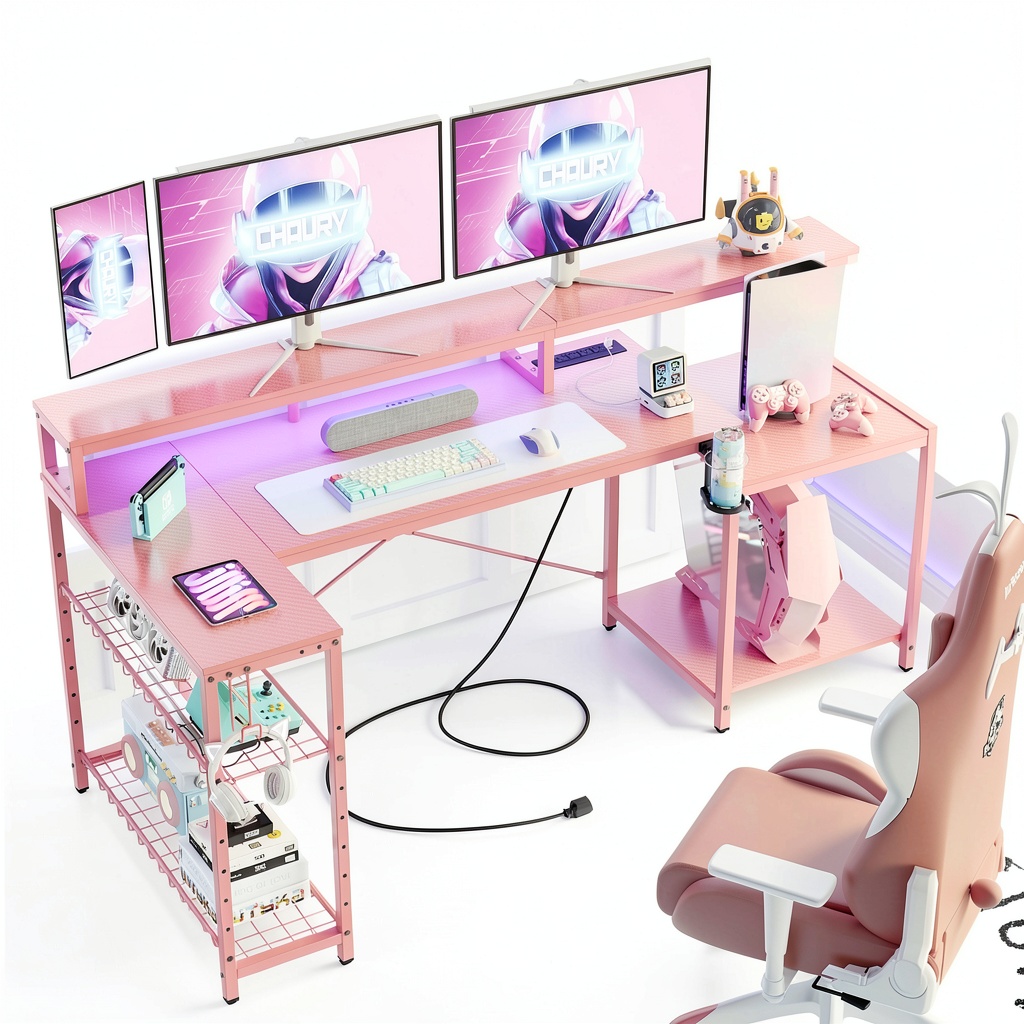
The Bestier L-shaped gaming desk positions itself as an all-in-one solution for gamers and remote workers who want functionality without the accessory clutter. At its core, it’s a 71-inch corner desk with integrated power management, RGB lighting, and some basic organizational accessories.
| Specification | Details |
|---|---|
| Overall Dimensions | 71.9″ L-shaped design |
| Desktop Material | P2 particleboard with carbon fiber texture |
| Power System | 4 AC outlets + 2 USB ports (1500W max) |
| RGB Lighting | 20 static colors, 22 dynamic modes |
| Monitor Stand | 5.9″ height adjustable shelf |
| Accessories | Metal grid, cup holder, headphone hook |
| Weight Capacity | Not officially specified (observe limitations) |
What these specs don’t tell you is how these features actually perform in daily use. The carbon fiber texture, for instance, is more than just aesthetic – it’s surprisingly resistant to fingerprints and minor scratches, which matters when you’re constantly moving peripherals around.
Real-World Performance & Feature Analysis
Design & Build Quality
The first thing you notice unboxing the Bestier is that it’s heavy – but not premium heavy. The particleboard construction has that specific density that signals “budget-friendly but functional.” During assembly, the metal frames felt sturdy enough for typical gaming loads, but I wouldn’t trust leaning my full weight on them.
The carbon fiber surface finish is better than I expected. After two months of daily use with multiple monitor stands, coffee spills, and general gaming wear, it’s held up remarkably well. The textured surface hides minor scratches that would be obvious on a gloss finish. However, the edges where the L-shape connects show some slight separation that made me wonder about long-term durability.
Real usage scenario: When my friend bumped into the desk during a VR session, the whole structure wobbled noticeably but held firm. This isn’t a tank-like professional streaming desk, but it’s sufficiently stable for normal use.
Performance in Real Use
Where this desk genuinely shines is the integrated power system. Having four AC outlets and two USB ports built into the desk surface eliminated my power strip tangles. During a typical gaming session, I could power my PC, two monitors, desk lamp, and charge my phone simultaneously without crawling under the desk.
However, there’s a trade-off: the outlet placement on the surface means cables still run across your workspace unless you’re diligent about routing. I found myself wishing for grommet holes or better underside cable management.
The RGB lighting delivers solid ambiance for the price. The 22 dynamic modes include smooth color transitions, strobes, and fading patterns that create that authentic gaming atmosphere. But here’s the reality check: the remote control feels cheap, and there’s no software integration. You’re not syncing these lights with your games – this is manual mood lighting, not Razer Chroma.
Real usage scenario: During evening gaming sessions, the RGB lighting actually reduced eye strain by providing ambient background light. But when I wanted to stream, the manual color changes became annoying rather than immersive.
Ease of Use & Daily Practicality
Assembly took me about 90 minutes working alone. The instructions were clear enough, though some steps required careful attention to orientation. The included tools were barely adequate – having your own electric screwdriver will save significant time and frustration.
The L-shape configuration provides generous surface area. I comfortably fit two 27-inch monitors, my PC tower, speakers, and still had space for notebooks and drinks. The monitor shelf creates a tiered effect that looks clean, but it reduces vertical space – my 32-inch monitor barely fit underneath.
The accessory attachments are hit-or-miss. The headphone hook is genuinely useful, but the cup holder felt flimsy and the metal grid storage limited what I could actually hang on it.
Durability & Reliability
After two months of heavy use, the desk surface shows no sagging or warping, which was my initial concern given the particleboard construction. The RGB lights continue working flawlessly, and the power outlets haven’t shown any issues with consistent use.
The areas showing wear are exactly where I expected: the screw connections have slight play, the monitor shelf has minor scratches from constant adjustment, and the surface shows some glossing in high-contact areas. This isn’t a desk that will look pristine after years of hard use, but it should hold up well with reasonable care.
Pros & Cons
What works well:
- Integrated power management – genuinely eliminates cable chaos
- Spacious L-shape design – accommodates multiple monitors comfortably
- RGB lighting quality – good brightness and color range for the price
- Surface durability – carbon texture resists scratches and stains well
- Value proposition – combines features usually found in more expensive desks
Where it falls short:
- Cable management limitations – surface outlets still create some clutter
- Basic construction materials – particleboard has that budget feel
- Monitor shelf height restriction – limits larger monitor compatibility
- Accessory quality – cup holder and grid feel like afterthoughts
- No advanced RGB integration – manual control only, no software sync
Comparison & Alternatives
Cheaper Alternative: Simpleness L-Shaped Desk ($65-80)
If you’re strictly budget-limited, the Simpleness offers basic L-shaped functionality without the RGB lighting or integrated power. You’ll need to add your own power strips and lighting, but you get similar surface area for about $30 less. Choose this if you’re willing to sacrifice integrated features for pure cost savings.
Premium Alternative: Eureka Ergonomic L-Shaped Desk ($250-300)
At nearly triple the price, the Eureka offers steel frame construction, built-in cable management channels, programmable RGB with app control, and generally superior build quality. Choose this if you’re streaming professionally or want a desk that will last 5+ years with heavy use.
The Bestier sits perfectly in the middle – it gives you 80% of the premium features at 40% of the price. The value equation makes sense if you want integrated power and lighting without professional-grade construction.
Buying Guide / Who Should Buy
Best for beginners: If you’re building your first serious gaming setup and want integrated features without complexity, the Bestier delivers good value. The all-in-one nature means you’re not figuring out separate power and lighting solutions.
Best for intermediate users: Gamers who understand what they want from their setup but have budget constraints will appreciate the balanced feature set. You’re getting functionality that usually requires multiple separate purchases.
Not recommended for: Professional streamers needing rock-solid stability for heavy equipment, users with very large monitors (over 32 inches) that won’t fit under the shelf, or anyone wanting automated RGB synchronization with their games.
Also avoid if: You have limited space – measure carefully because 71 inches is substantial, or you prioritize premium materials over features – the construction feels appropriate for the price but isn’t luxurious.
FAQ
How difficult is assembly really?
Moderately challenging for one person, straightforward for two. Budget 60-90 minutes and have an electric screwdriver ready. The instructions are adequate but pay close attention to orientation during the L-shape connection.
Can the power outlets handle a full gaming setup?
Yes, the 1500W rating comfortably handles PC, monitors, speakers, and charging devices. I ran my complete setup without issues, though I wouldn’t plug in space heaters or other high-draw appliances.
How does the RGB lighting compare to premium systems?
It creates excellent ambiance but lacks advanced features. You get manual color and pattern control versus software integration and game synchronization. For the price, the lighting quality is impressive, but manage expectations.
Is the monitor shelf necessary?
No, and this is important – the shelf is removable. I tried both configurations and preferred the cleaner look without it, plus it gave me more vertical space for my larger monitor.
Will this desk actually fit in my space?
Measure carefully – 71 inches means you need a decent-sized corner. The L-shape works well in room corners but demands more floor space than a straight desk.
Bottom line: The Bestier L-shaped gaming desk delivers remarkable value if you prioritize integrated features over premium construction. It solves real problems of cable management and basic lighting while providing ample space – just understand the compromises that make this price point possible.
-
Sale!


