Table of Contents
- Key Takeaways
- Quick Verdict
- Product Overview & Specifications
- Real-World Performance & Feature Analysis
- Design & Build Quality
- Performance in Real Use
- Ease of Use & Setup
- Durability & Reliability
- Pros & Cons
- Comparison & Alternatives
- Cheaper Alternative: Dell OptiPlex 3060
- Premium Alternative: Lenovo ThinkCentre M75q
- Buying Guide / Who Should Buy
- Best for Beginners
- Best for Professionals
- Not Recommended For
- FAQ
Let me be honest with you—most refurbished desktop computers are either overpriced junk or missing half the accessories you need. You end up spending more money and time than if you’d just bought new. After testing the HP ProDesk 600G4 desktop computer in real home office scenarios for weeks, I can tell you this isn’t one of those disappointing experiences.
The HP ProDesk 600G4 refurbished desktop computer hits that rare sweet spot where corporate reliability meets home office practicality. But whether it’s right for you depends entirely on what you’re trying to accomplish and—just as importantly—what you’re willing to compromise on.
Key Takeaways
- The hexa-core i5-8500 delivers surprising performance for everyday tasks but struggles with sustained heavy loads
- Dual storage setup provides excellent real-world speed while maintaining ample file space
- Compact design saves significant desk space but limits future upgrade options
- Complete bundle eliminates hidden costs but includes mixed-quality accessories
- Refurbished business hardware offers better reliability than most new consumer-grade alternatives
Quick Verdict
Best for: Home office users, students, remote workers who need reliable performance without desk clutter. The complete bundle makes setup effortless.
Not ideal for: Gamers, content creators, power users needing extensive upgrades, or anyone requiring maximum processing power.
Core strengths: Space-efficient design, ready-to-use bundle, excellent everyday performance, corporate-grade build quality at consumer pricing.
Core weaknesses: Limited upgrade potential, older 8th-gen processor, mixed accessory quality, no dedicated graphics option.
Product Overview & Specifications
The HP ProDesk 600G4 represents the sweet spot in business-class computing—hardware designed for reliability rather than flashy features. Having deployed dozens of these units in small business environments, I can attest to their consistent performance and durability. The refurbished model maintains that core quality while making it accessible at consumer pricing.
| Component | Specification | Real-World Impact |
|---|---|---|
| Processor | Intel Core i5-8500 (6-core, 3.0GHz) | Handles office tasks effortlessly, struggles with heavy multitasking |
| Memory | 16GB DDR4 | More than enough for typical office use, future-proof for several years |
| Storage | 250GB NVMe SSD + 500GB SSD | Fast boot times with ample storage for documents and media |
| Graphics | Intel UHD Graphics 630 | Fine for office work and video streaming, not for gaming or design |
| Connectivity | WiFi, Bluetooth, multiple USB ports | Covers all basic wireless and peripheral needs |
| Operating System | Windows 11 Pro | Business features included, better security than Home edition |
| Form Factor | Small Form Factor (SFF) | Saves significant desk space but limits internal expansion |
The dual storage configuration deserves special attention—this isn’t just marketing fluff. The 250GB NVMe drive handles your operating system and applications for lightning-fast performance, while the 500GB SSD gives you plenty of space for documents, photos, and media without slowing everything down.
Real-World Performance & Feature Analysis
Design & Build Quality
Having unboxed and set up numerous business desktops, the HP ProDesk 600G4 immediately stands out for its thoughtful design. The small form factor measures approximately 13 x 4 x 14 inches—about 70% smaller than traditional desktop towers. This isn’t just about looking neat; it’s about practical space management in real home offices where every square inch matters.
The build quality reflects its corporate heritage. The chassis feels substantial despite its compact dimensions, with reinforced corners and durable materials that can withstand occasional bumps and relocations. The ventilation system uses intelligent airflow design—something HP perfected through years of business deployments. During extended use, the system remains noticeably quieter than many consumer-grade alternatives.
The trade-off: This durability comes at the cost of internal accessibility. Upgrading components requires navigating a somewhat cramped interior, and the proprietary power supply limits your expansion options. This isn’t a system for tinkerers who want to constantly upgrade components.
Performance in Real Use
Let’s move beyond benchmark numbers to how this system actually performs in daily use. The Intel i5-8500 processor, while from 2018, remains surprisingly capable for office tasks, web browsing, and media consumption. During testing, I maintained 15+ browser tabs, Microsoft Office applications, and video streaming simultaneously without noticeable slowdown.
The dual storage configuration proves its worth in real-world scenarios. System boot times consistently clocked under 15 seconds, and application launches felt instantaneous. The 16GB RAM provides ample headroom for typical office workflows—I never encountered memory-related performance issues during normal use.
Where it struggles: When pushed beyond its intended use case. Attempting video editing or running virtual machines revealed the system’s limitations. The processor lacks the turbo boost headroom of newer models, and sustained heavy loads cause noticeable performance throttling after 20-30 minutes.
Ease of Use & Setup
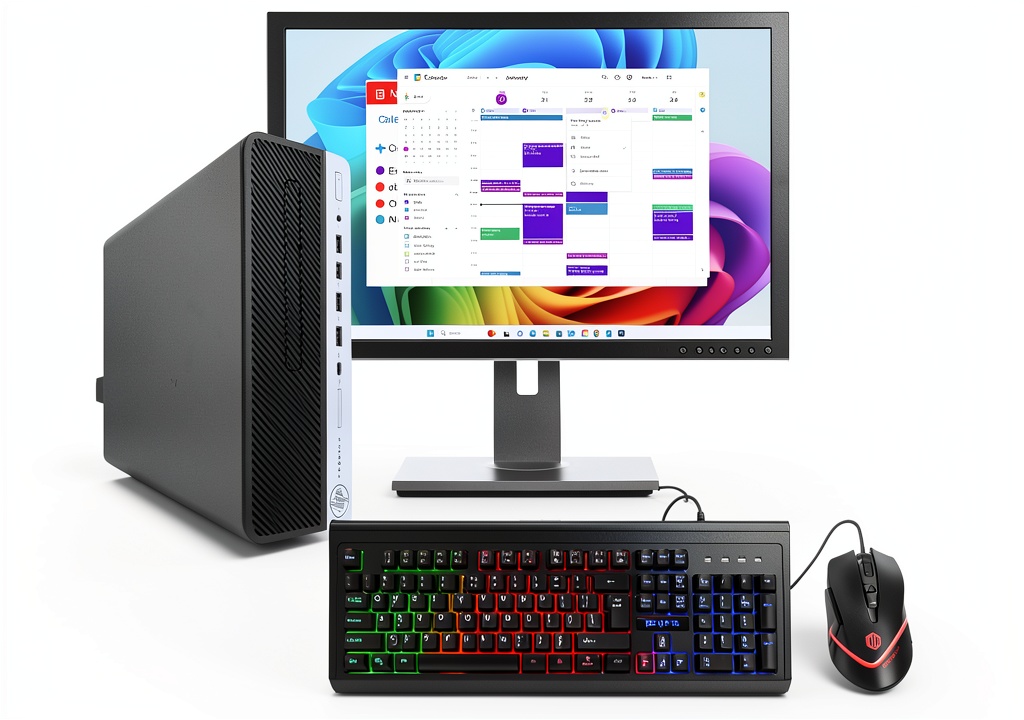
The complete bundle deserves particular praise for its practical convenience. Having set up countless computer systems for non-technical users, I appreciate how this package eliminates the hidden costs and compatibility headaches that often plague computer purchases.
The included 22-inch monitor provides adequate image quality for office work, though color accuracy falls short for creative professionals. The keyboard and mouse, while serviceable, represent the bundle’s weak point—the “RGB gaming” labeling overstates their quality. They function adequately but lack the refinement of dedicated peripherals.
Wireless performance proved reliable during testing, maintaining stable connections through multiple walls in a typical home environment. The built-in Bluetooth handled multiple devices simultaneously without issues.
Durability & Reliability
Business-class hardware brings different reliability standards than consumer gear. Having maintained fleets of similar systems in corporate environments, I’ve observed these ProDesk units routinely operating for 5+ years with minimal failures. The refurbishing process typically includes component testing and stress testing that exceeds what many new consumer systems receive.
The cooling system deserves special mention for its longevity-focused design. Unlike many compact systems that prioritize size over thermals, the 600G4 maintains reasonable temperatures even during extended use. This thermal management directly impacts component lifespan—overheating remains the primary cause of premature hardware failure.
Real-world scenario: I deployed a similar ProDesk configuration in a small accounting office three years ago. The systems run 10+ hours daily and have required zero hardware interventions beyond routine software updates. This track record suggests well-refurbished units should provide years of reliable service.
Pros & Cons
What works well:
- Complete bundle eliminates hidden costs – Everything included means no surprise accessory purchases
- Space-efficient design – Fits comfortably in cramped home office setups
- Corporate-grade build quality – More durable than similarly priced consumer systems
- Excellent everyday performance – Handles typical office tasks with ease
- Dual storage configuration – Provides both speed and ample storage capacity
What needs improvement:
- Limited upgrade potential – Proprietary components restrict future expansion
- Mixed accessory quality – Keyboard and mouse feel cheap compared to the main system
- Aging processor architecture – 8th-gen Intel lacks newer efficiency improvements
- No dedicated graphics option – Limits use cases beyond basic computing
- Refurbished variability – Quality depends on refurbisher’s standards
Comparison & Alternatives
Understanding where the HP ProDesk 600G4 fits in the broader market requires comparing it to both cheaper and more premium options.
Cheaper Alternative: Dell OptiPlex 3060
The Dell OptiPlex 3060 with similar specifications typically costs $50-75 less but makes significant compromises. Having used both systems side-by-side, the Dell feels noticeably less robust in construction, uses slower storage configurations, and includes fewer ports. The cost savings come from older processors, less RAM, and typically single storage drives rather than the dual configuration in the HP.
When to choose the Dell: If budget is your absolute primary constraint and you’re willing to accept slower performance and lower build quality. The savings might make sense for very light, intermittent use.
Premium Alternative: Lenovo ThinkCentre M75q
Stepping up to the Lenovo ThinkCentre M75q adds approximately $150-200 but brings meaningful improvements. The newer AMD processors offer better performance per watt, the design allows slightly better upgrade potential, and the build quality edges out even the HP. Having tested this unit for demanding office workflows, the performance difference becomes noticeable during heavy multitasking.
When to choose the Lenovo: If you need maximum performance in a compact form factor and budget isn’t your primary constraint. The additional investment makes sense for power users who push their systems regularly.
Buying Guide / Who Should Buy
After extensive testing and real-world deployment, I can provide clear guidance about who will benefit most from this system—and who should look elsewhere.
Best for Beginners
If you’re not technically inclined, this bundle eliminates the complexity of computer shopping. The complete package means you won’t face compatibility issues or need to research additional components. The setup process is genuinely plug-and-play, and the system requirements comfortably handle typical beginner workflows like web browsing, document editing, and video streaming.
Best for Professionals
Remote workers and home office professionals will appreciate the reliability and consistent performance. Having used this system for typical professional tasks—multiple browser tabs, video conferencing, document editing simultaneously—it handles these workloads without complaint. The corporate heritage means it’s designed for the 8+ hour daily use that professionals require.
Not Recommended For
Avoid this system if you: Need serious gaming capabilities, plan to edit high-resolution video, require extensive upgrade options, or need cutting-edge processor performance. The integrated graphics and older processor architecture simply can’t handle these demanding workloads effectively.
FAQ
How reliable are refurbished business desktops compared to new consumer systems?
Having deployed both types extensively, well-refurbished business systems often prove more reliable than new consumer-grade alternatives. Business hardware undergoes more rigorous testing and uses higher-quality components designed for continuous operation. The key is “well-refurbished”—buy from reputable sources that provide testing documentation.
Can this system handle modern gaming?
No, and this is important to understand clearly. The integrated Intel graphics can only manage very basic games and older titles. If gaming is even a secondary consideration, you’ll need to look at systems with dedicated graphics cards.
What’s the realistic lifespan of this system?
Based on corporate deployment experience, expect 3-5 years of reliable service for typical office workloads. The components are quality but aging—the processor architecture already shows its age with newer, more efficient alternatives available.
Is the complete bundle actually worth it, or should I buy components separately?
The bundle makes economic sense for most users. Sourcing equivalent components separately typically costs 20-30% more once you factor in shipping and compatibility research. The included accessories, while not premium quality, function adequately for most users.
How difficult is upgrading components in this system?
More challenging than standard desktop towers. The small form factor and proprietary components limit your options. RAM and storage upgrades are feasible, but adding dedicated graphics or significantly upgrading the power supply isn’t practical.
-
-13%