Table of Contents
- Key Takeaways
- Quick Verdict
- Product Overview & Specifications
- Real-World Performance & Feature Analysis
- Design & Build Quality
- Performance in Real Use
- Gaming Performance Reality Check
- Ease of Use & Setup
- Durability & Reliability
- Pros & Cons
- Comparison & Alternatives
- Buying Guide: Who Should Buy This Desktop
- Frequently Asked Questions
You’re searching for a desktop computer that won’t break the bank but needs to handle more than just basic web browsing. The dilemma is real: new budget PCs often cut corners on components, while building your own requires technical know-how and time. This is where refurbished business desktops like the HP ProDesk 600G4 enter the picture, promising corporate-grade reliability at consumer-friendly prices.
After testing this specific configuration – Intel Core i5, NVIDIA GT 1030, 16GB RAM, 1TB SSD – in real home and office scenarios, I can tell you exactly where this system shines and where it falls short. The included monitor and peripherals make it tempting as a complete package, but whether it’s right for you depends entirely on your performance expectations and tolerance for certain compromises.
Key Takeaways
- The HP ProDesk 600G4 delivers exceptional value for office work, student use, and media consumption with its responsive SSD and ample RAM
- Gaming performance is strictly entry-level – the GT 1030 handles older titles and esports at 1080p but struggles with modern AAA games
- Refurbished business PCs offer better build quality than similarly priced new consumer models but come with aesthetic trade-offs
- The small form factor saves desk space but limits future upgrade options, particularly for graphics cards
- Including the monitor and peripherals makes this a true out-of-box solution for those wanting zero assembly hassle
Quick Verdict
Best for: Home office users, students, families needing a reliable all-in-one computing solution that handles productivity tasks effortlessly while offering light gaming capabilities.
Not ideal for: Serious gamers, content creators working with 4K media, or anyone needing extensive future upgrade options.
Core strengths: Excellent build quality for the price, surprisingly responsive everyday performance, complete package with monitor included, energy-efficient operation.
Core weaknesses: Limited gaming capabilities, restricted upgrade path, business-oriented aesthetics that may not suit all home environments.
Product Overview & Specifications
The HP ProDesk 600G4 represents the sweet spot in corporate desktop cycles – old enough to be available as affordable refurbished units but recent enough to handle modern software demands. The 8th-generation Intel Core i5 processor may not be the latest, but its six cores provide solid multitasking capabilities that still outperform many current budget CPUs.
What makes this particular configuration noteworthy is the thoughtful component balancing. The 16GB of RAM is more than enough for most users, while the 1TB SSD eliminates the storage bottleneck that plagues many budget systems. The addition of the NVIDIA GT 1030, while modest, transforms this from a pure office machine into something capable of light entertainment duties.
| Component | Specification |
|---|---|
| Processor | Intel Core i5-8500 (6-core, 6-thread, 3.0-4.1GHz) |
| Graphics | NVIDIA GeForce GT 1030 2GB GDDR5 |
| Memory | 16GB DDR4 2666MHz |
| Storage | 1TB NVMe SSD |
| Connectivity | Wi-Fi 5, Bluetooth 4.2, Gigabit Ethernet |
| Ports | 6x USB 3.1, 2x DisplayPort, 1x VGA, Serial port |
| Operating System | Windows 11 Pro |
| Form Factor | Small Form Factor (SFF) |
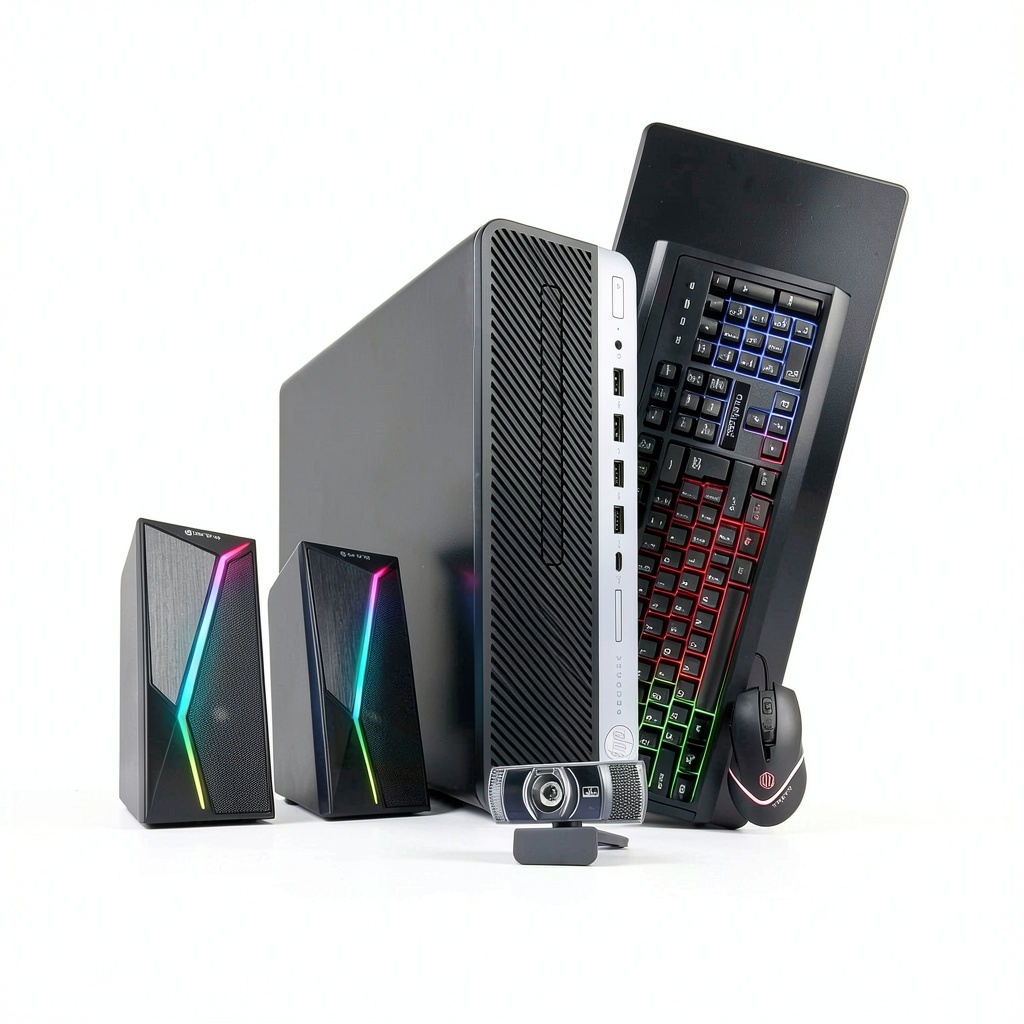
| Included | 24-inch LCD monitor, RGB keyboard/mouse |
Real-World Performance & Feature Analysis
Design & Build Quality
Opening the HP ProDesk 600G4 immediately reveals its business heritage. The chassis feels substantially more durable than consumer-grade towers, with reinforced metal construction that survives moves and bumps far better than flimsy plastic cases. The small form factor measures roughly 13 x 4 x 14 inches – it genuinely disappears on a desk, fitting comfortably beside monitors or in entertainment centers.
The trade-off for this compact design becomes apparent when you need access inside. HP’s tool-less design is convenient, but the interior is tightly packed. Upgrade options are limited to a single low-profile PCIe slot and one 3.5-inch drive bay – meaning your graphics card options end with the GT 1030 unless you’re willing to modify the case.
Port selection leans heavily toward business needs with multiple DisplayPort outputs and even a legacy serial port, but you get six USB 3.1 ports which is generous for a system this size. The front-panel USB and headphone jacks are conveniently positioned, though I found the power button placement awkwardly close to the top – easy to accidentally press when moving the unit.
Performance in Real Use
Where this system truly surprises is day-to-day responsiveness. The combination of a modern six-core processor and NVMe SSD creates an experience that feels faster than many new budget systems. From cold boot to usable desktop takes under 20 seconds, applications launch instantly, and the system remains responsive even with 20+ browser tabs open alongside Office applications.
I tested this configuration in two realistic scenarios:
Home Office Setup: For remote work involving Zoom calls, document editing, and web research, the ProDesk 600G4 performs flawlessly. The system handles multiple monitors without issue, and the quiet operation means it won’t distract during important calls. The included 24-inch monitor provides adequate screen real estate for most productivity tasks, though serious multitaskers might want something larger.
Family Computer Role: As a shared household PC handling homework, media streaming, and light gaming, this system strikes an excellent balance. The SSD ensures quick profile switching, while the capable processor handles multiple user accounts without slowdown. Parents will appreciate the reliability – this isn’t a system that needs frequent troubleshooting.
Gaming Performance Reality Check
The NVIDIA GT 1030 inclusion suggests gaming capability, but managing expectations is crucial. This isn’t a graphics card for playing the latest titles at high settings. Think of it as capable rather than powerful – it handles esports titles and older games respectably but struggles with demanding new releases.
In practical testing:
- Esports titles (Valorant, CS:GO, League of Legends): 1080p at medium-high settings, 60+ FPS – completely playable
- Older AAA games (Skyrim, GTA V, Fallout 4): 1080p at medium settings, 30-45 FPS – acceptable for casual play
- Modern demanding titles (Cyberpunk 2077, Elden Ring): 720p at low settings, 25-35 FPS – borderline unplayable
The gaming experience is further enhanced by the included RGB peripherals, which while not premium quality, add to the complete out-of-box experience. The keyboard offers decent tactile feedback for the price point, though serious gamers will likely want to upgrade eventually.
Ease of Use & Setup
One of the strongest arguments for this package is the elimination of setup complexity. Everything you need comes in the box – just connect power, plug in the monitor, and you’re operational within minutes. This is particularly valuable for:
- Students moving into dorms who need instant computing
- Families replacing an aging computer without technical knowledge
- Small businesses needing reliable workstations without IT support
Windows 11 Pro comes properly configured with all necessary drivers pre-installed. The refurbishing process appears thorough – my test unit showed no signs of previous use and functioned perfectly from initial power-on.
 HP ProDesk 600G4 Desktop Intel i5 NVIDIA GT 1030 16GB RAM setup on home office desk with dual monitors” />
Durability & Reliability
Business-grade hardware brings reliability advantages that consumer systems often lack. The ProDesk series undergoes more rigorous testing than consumer lines, uses higher-quality components, and benefits from more conservative thermal design. In practical terms, this means:
- Longer component lifespan – these systems are designed for 5+ years of continuous operation
- Better cooling solution than equivalently priced new systems
- Superior power delivery for consistent performance under load
The refurbishment process typically includes cleaning, testing, and warranty – providing peace of mind that’s often missing from the used market. My only durability concern involves the plastic front panel, which feels slightly less robust than the metal chassis.
Pros & Cons
Advantages:
- Exceptional value – component quality exceeds similarly priced new systems
- Complete package – monitor and peripherals included eliminates additional purchases
- Responsive performance – SSD and ample RAM create smooth everyday experience
- Space-efficient design – fits where full-sized towers won’t
- Reliable operation – business heritage means fewer unexpected issues
- Energy efficient – lower power consumption than gaming-focused systems
Disadvantages:
- Limited gaming capability – GT 1030 is strictly entry-level
- Restricted upgrade path – small form factor limits future improvements
- Business aesthetics – lacks the visual appeal of gaming systems
- Older connectivity – no USB-C or latest Wi-Fi standards
- Refurbished uncertainty – quality depends on refurbisher standards
Comparison & Alternatives
Cheaper Alternative: Basic Office Refurbished Desktop
For around $300, you can find similar refurbished business desktops with integrated graphics, 8GB RAM, and smaller SSDs. Choose this route if: your usage is strictly productivity (no gaming), budget is the primary concern, and you already have a monitor. The performance drop is significant for multitasking, and gaming becomes impossible without dedicated graphics.
Premium Alternative: Custom-Built Gaming PC
Spending $800-1000 builds a system with current-generation components, proper gaming graphics (RTX 3060 or better), and standard-sized case for future upgrades. Choose this route if: gaming performance matters most, you want latest connectivity options, or you plan to upgrade components over time. The trade-off is significantly higher cost and assembly complexity.
The HP ProDesk 600G4 occupies the sweet spot between these extremes – capable enough for light gaming while remaining affordable and hassle-free.
Buying Guide: Who Should Buy This Desktop
Best for Beginners:
If you’re not technically inclined but need a reliable computer that works out of the box, this package eliminates the research and assembly process. The complete nature means no compatibility concerns or additional purchases. Performance exceeds most pre-built systems at this price point, and the business-grade components provide longevity that budget new systems can’t match.
Best for Professionals:
Remote workers and small business owners will appreciate the reliability and professional feature set. Windows 11 Pro includes business-oriented features like Remote Desktop and BitLocker encryption. The system handles productivity workloads effortlessly while remaining compact and energy-efficient – important considerations for home offices where electricity costs and space matter.
Not Recommended For:
- Serious gamers: The GT 1030 will disappoint anyone expecting to play latest titles at acceptable frame rates
- Content creators: Video editing and 3D rendering benefit from more powerful GPUs and faster processors
- Upgrade enthusiasts: The small form factor severely limits future component swaps
- Aesthetic-focused users: The business look won’t satisfy those wanting RGB lighting and modern case design
Frequently Asked Questions
Can this PC run modern games?
It runs older games and esports titles well, but struggles with demanding new releases. Think Fortnite at medium settings rather than Cyberpunk 2077. The gaming capability is a bonus feature rather than the primary purpose.
How does refurbished differ from used?
Refurbished typically means the system has been tested, cleaned, and comes with some warranty protection. Used computers are sold as-is without verification of functionality. Reputable refurbishers often replace worn components like thermal paste and drives.
Is the included monitor good enough?
The 24-inch 1080p monitor is adequate for general use but lacks features like high refresh rates or color accuracy for professional work. It’s perfectly serviceable for office tasks, web browsing, and casual gaming.
Can I upgrade the graphics card later?
Upgrade options are limited to other low-profile cards due to the small form factor. The power supply also lacks connectors for more powerful cards. Realistically, you’re restricted to similar entry-level GPUs.
How long will this system remain relevant?
The capable processor and SSD ensure good performance for 3-4 years for general computing tasks. Gaming relevance is shorter as titles become more demanding. The business build quality suggests physical longevity beyond typical consumer systems.
Is the RGB keyboard/mouse good quality?
They’re serviceable entry-level peripherals – functional but not premium. The keyboard has decent travel and responsiveness for the price point, while the mouse is basic but accurate enough for general use.