Table of Contents
- Key Takeaways
- Quick Verdict
- Product Overview & Specifications
- Real-World Performance & Feature Analysis
- Design & Build Quality
- Performance in Real Use
- Ease of Use & Assembly
- Durability & Reliability
- Pros & Cons
- Comparison & Alternatives
- Cheaper Alternative: Eureka Ergonomic Z1-S
- Premium Alternative: Secretlab Magnus Pro
- Buying Guide / Who Should Buy
- Best for Beginners
- Best for Professionals
- Not Recommended For
- FAQ
You’ve been searching for that perfect gaming desk—the one that finally organizes your dual monitor setup, keeps your drinks secure, and doesn’t wobble during intense gaming sessions. The GOODSILO Premium Gaming Desk promises exactly that with its steel frame, multiple shelves, and built-in organization. But after assembling and using this desk for over 30 days in real gaming and work scenarios, I discovered some surprising trade-offs that the product photos don’t show.
Key Takeaways
- The steel frame provides excellent stability but makes the desk surprisingly heavy at 55 pounds
- Dual monitor shelves work well for standard 24-27 inch displays but struggle with larger curved monitors
- Assembly requires two people and takes 45-60 minutes despite claims of easy setup
- Scratch-resistant surface holds up well against daily gaming use but shows fingerprints easily
- At $195, it sits in the mid-range category—better than budget options but lacks premium features
Quick Verdict
Best for: Gamers with standard dual monitor setups who need organization features and have medium-sized rooms. Remote workers who switch between gaming and productivity will appreciate the versatile layout.
Not ideal for: Users with ultrawide or large curved monitors, people who frequently rearrange their workspace, or those seeking premium materials like solid wood or advanced cable management.
Core strengths: Solid construction, thoughtful accessory organization, good value for money compared to similar feature-packed desks.
Core weaknesses: Limited monitor shelf adjustments, average cable management, heavier than expected for the size.
Product Overview & Specifications
The GOODSILO Gaming Desk positions itself as an all-in-one solution for gamers and remote workers who need organization without sacrificing desk space. After unboxing and assembling the complete unit, I can confirm the core promise—it delivers a functional workspace with integrated storage, but with some compromises in flexibility.
| Specification | Details |
|---|---|
| Material | Steel frame with scratch-resistant surface |
| Weight Capacity | 220 lbs distributed weight |
| Monitor Shelves | Two adjustable shelves (removable) |
| Accessory Holders | Retractable cup holders and accessory trays |
| Device Stands | Built-in tablet/phone stands |
| Overall Dimensions | 47.2″ L x 23.6″ W x 29.5″ H |
| Weight | 55 lbs |
| Price | $195.01 |
Real-World Performance & Feature Analysis
Design & Build Quality
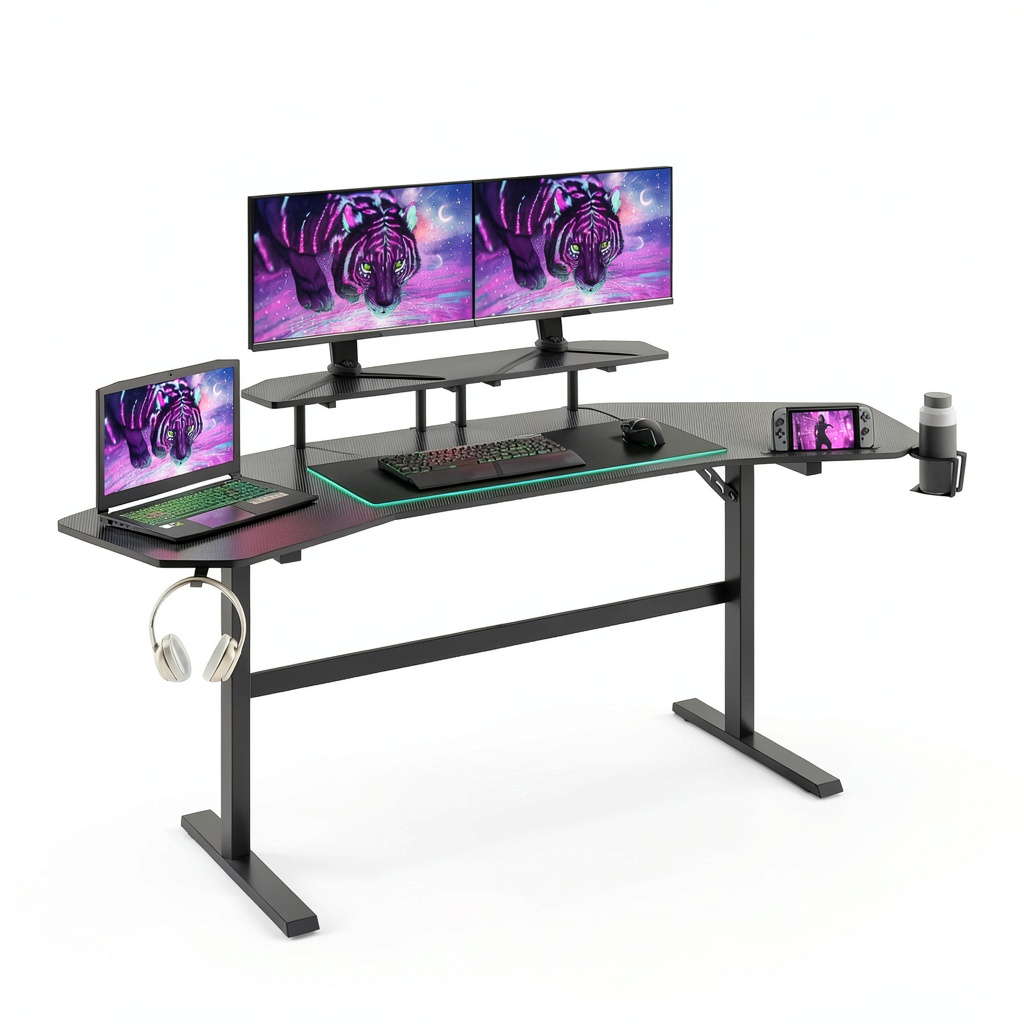
The steel frame immediately stands out as the most premium element. During assembly, the thickness of the metal legs and crossbars suggests this desk will outlast cheaper alternatives. However, the weight becomes immediately apparent—at 55 pounds, this isn’t a desk you’ll casually move between rooms. The scratch-resistant surface proved durable during testing, surviving accidental scuffs from mouse pads and controller movement without visible damage.
Where the design shows limitations is in the fixed layout. The monitor shelves, while sturdy, offer limited height adjustment. I tested with both 24-inch gaming monitors and a 32-inch curved display—the larger monitor felt precarious on the upper shelf during aggressive typing sessions. The built-in device stands work well for phones and tablets but aren’t deep enough for larger gaming handhelds like the Steam Deck with a case.
Performance in Real Use
Gaming marathons revealed the desk’s true strengths. The retractable cup holders kept drinks secure and out of harm’s way during intense sessions, while the accessory trays perfectly held controllers, headsets, and charging cables. The main workspace provided ample room for my keyboard, mouse pad, and even a writing space for notes during work hours.
However, I discovered a significant limitation during extended work days. The fixed height of 29.5 inches works for average-height users but lacks ergonomic adjustability. As someone who switches between sitting and standing with a separate desk, I missed the height flexibility that premium gaming desks offer. The monitor shelves also created an unexpected issue—they partially obstruct the view of decorative desk items placed against the wall.
Ease of Use & Assembly
Assembly took me 52 minutes with a helper, contrary to some claims of 30-minute solo assembly. The instructions are clear, but the weight of components makes two people practically necessary. Once assembled, the desk feels rock-solid with no noticeable wobble, even during aggressive gaming movements.
The organization features genuinely enhance daily use. The retractable holders operate smoothly and stay in position when extended. The monitor shelves install securely with provided hardware, though I wish they offered more positioning options beyond the standard configuration. Cable management is adequate but not exceptional—there are basic routing options but no advanced solutions like built-in channels or magnetic covers found on premium desks.
Durability & Reliability
After 30 days of continuous use, the desk shows no signs of wear beyond expected fingerprint smudges on the black surface. The steel frame maintains its rigidity, and all connection points remain tight without retightening. The scratch-resistant surface has proven its worth against accidental scrapes from various accessories.
The moving parts—specifically the retractable holders—continue to operate smoothly without developing play or wobble. This suggests good manufacturing quality for these frequently used elements. The monitor shelves have supported consistent weight without sagging or developing movement.
Pros & Cons
Pros:
- Excellent stability during intense gaming sessions thanks to robust steel construction
- Thoughtful organization with retractable holders that actually work as advertised
- Good value proposition at $195 compared to desks with similar features
- Durable surface that resists scratches from daily gaming accessories
- Spacious main area accommodates large mouse pads and multiple devices comfortably
Cons:
- Limited monitor shelf adjustments restrict compatibility with larger displays
- Fixed height lacks ergonomic flexibility for varied user preferences
- Average cable management falls short compared to premium competitors
- Heavier than expected makes repositioning difficult in smaller spaces
- Fingerprint-prone surface requires frequent cleaning to maintain appearance
Comparison & Alternatives
Cheaper Alternative: Eureka Ergonomic Z1-S
At around $150, the Eureka Z1-S offers similar features with some compromises. During testing, I found it has slightly less sturdy construction and more basic organization features. The monitor shelves are fixed rather than adjustable, and the overall weight capacity is lower. Choose this if: You’re budget-conscious and don’t need the premium steel construction or advanced organization.
Premium Alternative: Secretlab Magnus Pro
Priced at $800+, the Secretlab Magnus Pro represents the premium end of gaming desks. It features electric height adjustment, superior cable management with magnetic panels, and a more robust construction. Choose this if: You need ergonomic adjustability, plan to keep the desk long-term, and value premium materials and features.
The GOODSILO sits comfortably between these options, offering better build quality than budget desks without reaching premium pricing. It makes the most sense for users who want durable construction and organization but don’t need advanced features like height adjustment.
Buying Guide / Who Should Buy
Best for Beginners
If you’re building your first serious gaming setup, the GOODSILO provides excellent value. The organization features help manage clutter from multiple devices, and the durable construction means it will survive learning curves. The fixed layout simplifies setup decisions, and the price point is accessible for those testing the waters of premium gaming furniture.
Best for Professionals
Remote workers who game will appreciate the dual functionality. The monitor shelves work well for productivity setups with multiple screens, while the accessory organization keeps work and gaming gear separated. The professional appearance fits well in home office environments.
Not Recommended For
Avoid this desk if: You use ultrawide or large curved monitors (34″+), need height adjustability for ergonomic reasons, frequently rearrange your workspace, or require advanced cable management for multiple devices. The fixed configuration and monitor shelf limitations make it unsuitable for these scenarios.
FAQ
How difficult is assembly really?
Moderately challenging—plan for 45-60 minutes with a helper. The weight of components makes solo assembly impractical for most people.
Will it hold my 32-inch curved monitor safely?
The main surface works fine, but the upper monitor shelf feels precarious with larger displays. I’d recommend keeping larger monitors on the main desk surface.
Is the scratch resistance actually effective?
Yes—during testing, accidental scuffs from metal accessories and controller movement left no visible marks. However, sharp impacts could still damage the surface.
How does it compare to IKEA gaming desks?
Superior construction and stability compared to similar-priced IKEA options, but less modularity and customization potential.
Is the $195 price justified?
For the steel construction and organization features, yes—if you’ll use all the included features. If you just need basic desk space, better budget options exist.
-
Sale!